

Our Verdict
A 2-in-1 laptop delivers real value for users who genuinely switch between typing and touch-based tasks - students, note-takers, and people who consume media on the go will find it practical. For users rooted at a desk or running demanding software, the extra cost and weight rarely pay off. The flexibility is real, but only useful if your habits actually call for it.
Best suited to students, light professionals, and anyone who regularly moves between typing work, sketching, note-taking, or media consumption in different physical settings.
What a 2-in-1 Laptop Actually Is
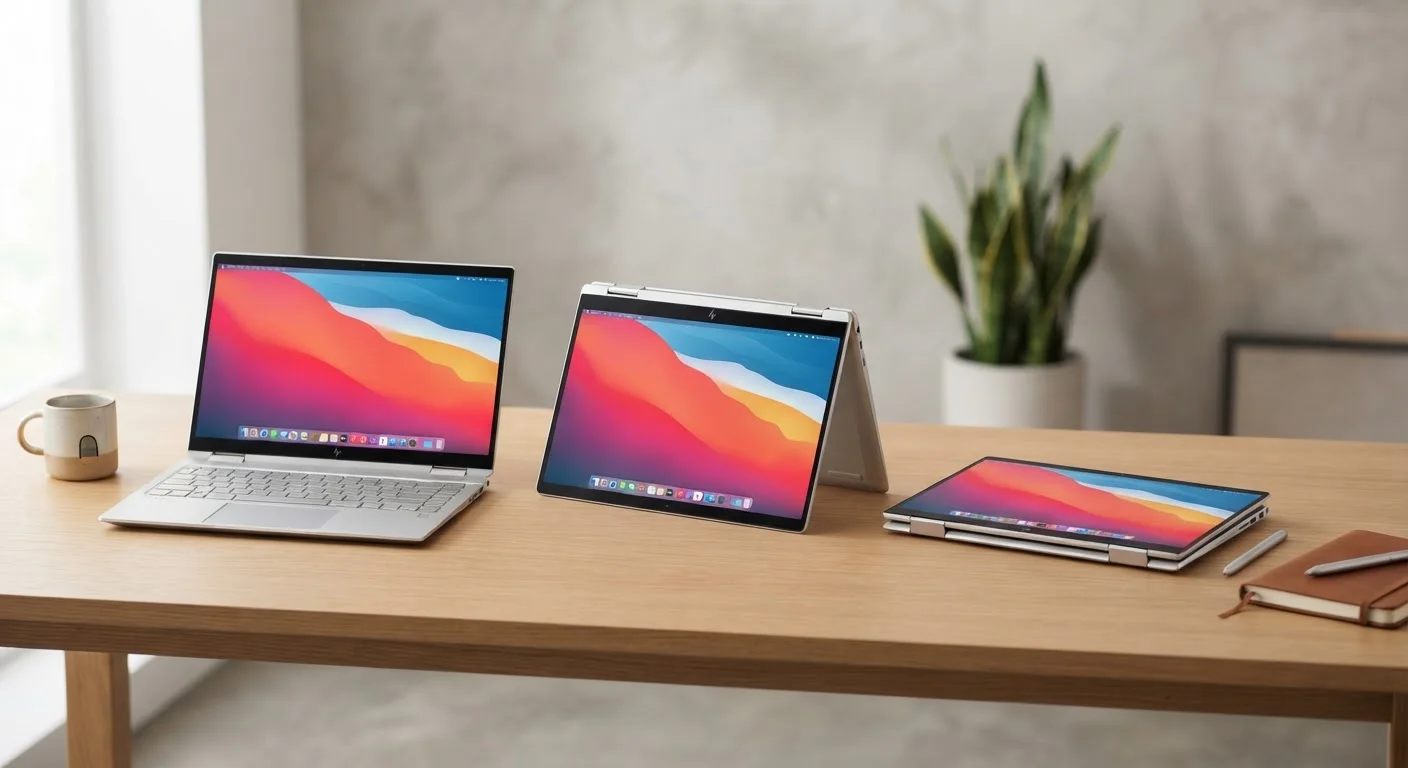
A 2-in-1 laptop - sometimes called a convertible - is a portable computer that functions as both a traditional laptop and a tablet. Two main designs exist: detachable models, where the screen separates entirely from the keyboard, and convertible models, where the hinge folds 360 degrees so the keyboard folds behind the display.
In practice, most people use them in two or three positions: standard laptop mode for typing, tablet mode for reading or sketching, and tent or stand mode for watching video. If you're trying to decide whether the form factor fits your life, see our guide to choosing between a desktop and laptop for broader context on how to frame that decision.
The Real Advantages
The case for a 2-in-1 is straightforward when your daily habits actually span multiple modes.
One device replaces both laptop and tablet
Carrying a single 2-in-1 instead of separate devices reduces bag weight and simplifies charging. For frequent travelers or commuters, that consolidation has practical, everyday value.
Touchscreen adds a genuinely different input method
Scrolling, pinching, and tapping can be faster and more natural for certain tasks - browsing, annotating documents, or navigating maps - than using a trackpad.
Stylus support enables handwritten notes and sketching
Many 2-in-1s are compatible with active stylus pens, making digital note-taking feel closer to pen and paper. This is particularly useful for students and anyone who thinks visually.
Versatile positioning for different environments
Tent and stand modes make these devices practical on airplane tray tables, kitchen counters, or other cramped spaces where a standard laptop lid would be awkward.
Touchscreen works well for media consumption
Flipping to tablet mode for reading, streaming, or casual browsing feels more relaxed and natural than hunching over a traditional clamshell laptop.
One genuinely underrated benefit is stylus support. Many 2-in-1s support an active stylus pen, making handwritten notes and light sketching possible in a way a standard laptop never allows. For students or visual thinkers, that can matter far more than any spec on paper. If you're evaluating what distinguishes this category from a straight tablet, our comparison of tablet vs. laptop trade-offs covers that ground clearly.
The Genuine Limits
No device does everything well, and 2-in-1s have specific areas where they fall short compared with purpose-built alternatives.
Higher price than comparable standard laptops
The hinge engineering, touchscreen panel, and stylus compatibility all add to the manufacturing cost. At a given budget, you typically get less processing power or storage than a non-convertible at the same price.
Heavier and thicker than standard thin-and-light laptops
The reinforced hinge mechanism and touchscreen layer add measurable weight. Users who prioritize raw portability often find a traditional thin laptop easier to carry all day.
Keyboard quality is often compromised
Detachable keyboard designs in particular tend toward shallower key travel and less rigidity than a dedicated laptop keyboard - a meaningful downside for heavy typists.
Performance ceilings for demanding tasks
Thermal constraints in slim convertible chassis mean processors often throttle under sustained loads. Video editing, 3D rendering, and serious gaming will expose these limits quickly.
Tablet mode usability varies widely by software
Windows, the most common OS on convertibles, has improved touch support but many desktop applications still aren't designed for finger input - making tablet mode feel clumsy for some workflows.
Flexibility goes unused if habits don't match the form
Research consistently shows many convertible owners default to laptop mode almost exclusively. Paying for versatility you don't use is one of the most common forms of tech buyer's regret.
Detachable vs. Convertible: A Key Distinction
Not all 2-in-1s behave the same way. Detachable models (where the screen fully separates) feel more like a true tablet but often have weaker keyboard attachments and limited lap stability. Convertibles with a 360-degree hinge keep the keyboard attached at all times, which solves the lap-use problem but means you're always carrying the full weight even in tablet mode. Understanding which design matches your habits is as important as comparing specs.
Performance compromises are worth examining before you commit. Many 2-in-1s use lower-wattage processors to manage heat within a thinner chassis - reasonable for email, documents, and video streaming, but limiting for video editing, gaming, or large data sets. Check common laptop shopping pitfalls before finalizing any decision so you avoid a purchase you'll regret within months.
Who Gets the Most - and Least - Out of One
Good fit: Students who take notes by hand and read PDFs. Professionals who travel frequently and want one device for flights and desk use. Anyone whose day naturally alternates between creating and consuming content.
Poor fit: Users who stay at a fixed desk most of the day. Anyone running specialized software that demands sustained high performance. People who rarely or never use a touchscreen even when one is available - and that describes more people than you might expect.
~30%
Premium over comparable standard laptops
Industry analysts have generally estimated convertible laptops carry a price premium of roughly 20-35% over standard clamshell models with similar processors and storage.
2-in-1
Modes most owners actually use regularly
Usage surveys from PC market research firms have found that a significant share of 2-in-1 owners primarily use laptop mode, with tablet mode used occasionally rather than daily.
Before choosing this form factor, it's worth being honest about the last month of your computing habits. If you've never reached for a touchscreen on devices that have one, a 2-in-1's flexibility may add cost without adding value. For a broader look at how operating systems shape the experience regardless of form factor, see how Windows and macOS differ in real use.
The content on this site is provided for informational purposes only and should not be considered a substitute for professional advice. While we strive to provide accurate and up-to-date information, we make no guarantees regarding its completeness or accuracy. Always consult a qualified professional for advice specific to your circumstances before making any decisions.